Desktop media workbench · Windows 10+ · macOS · Linux
Capture, convert, edit.
One desktop workbench.
For creators, teams, and archivists who need to keep, convert, and reuse media they own or are authorized to use, without switching between several apps.
ClipHearth finds the video or sound playing on the page you open and saves it in the best quality on offer. Then it converts, trims, grades, and extracts audio right on your computer, all in one app.
v1.3.9 · free to try: 3 tasks per device, no card, no account · all builds ↓
For media you own or are authorized to keep. ClipHearth does not circumvent DRM.
- Capture
- Video · sound · live streams · playlists
- Convert
- 11 video · 9 audio formats
- Edit
- Trim · join · color · speed · GIF
- Platforms
- Windows 10+ · macOS · Linux
- License
- Lifetime or monthly · 3 free tasks to try
Take the tour. Click around.
A clickable replica of ClipHearth 1.3.9, running right in this page, with the same layout, states, and flow as the desktop app. Detect the sample stream, download it, run it through the Convertor wizard, then grade it in the Editor.
 ClipHearthv1.3.9
Simulated in your browser: nothing is downloaded, uploaded, or counted against your trial. The real work happens in the desktop app, on your machine.
The real app · screenshots from macOS
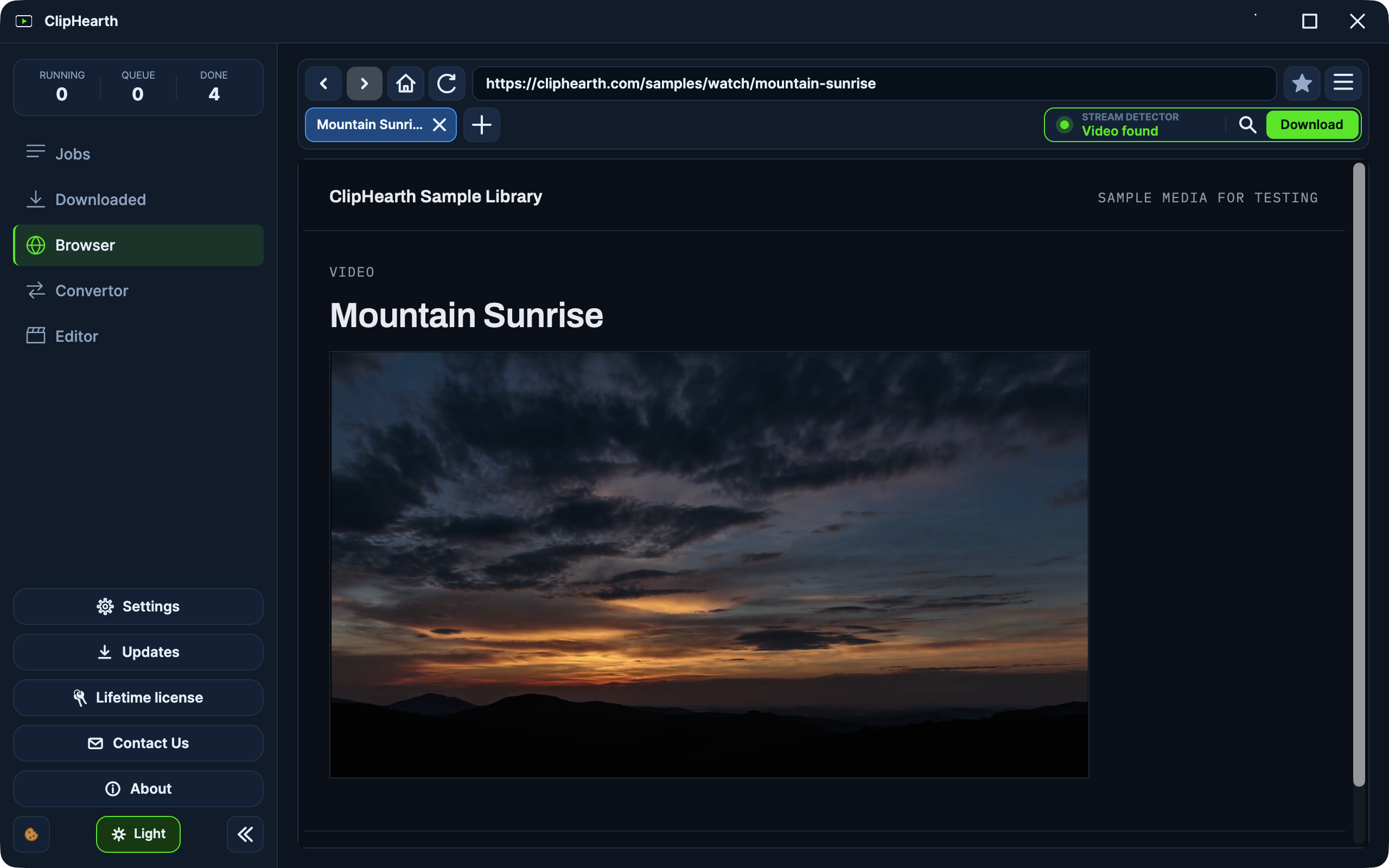
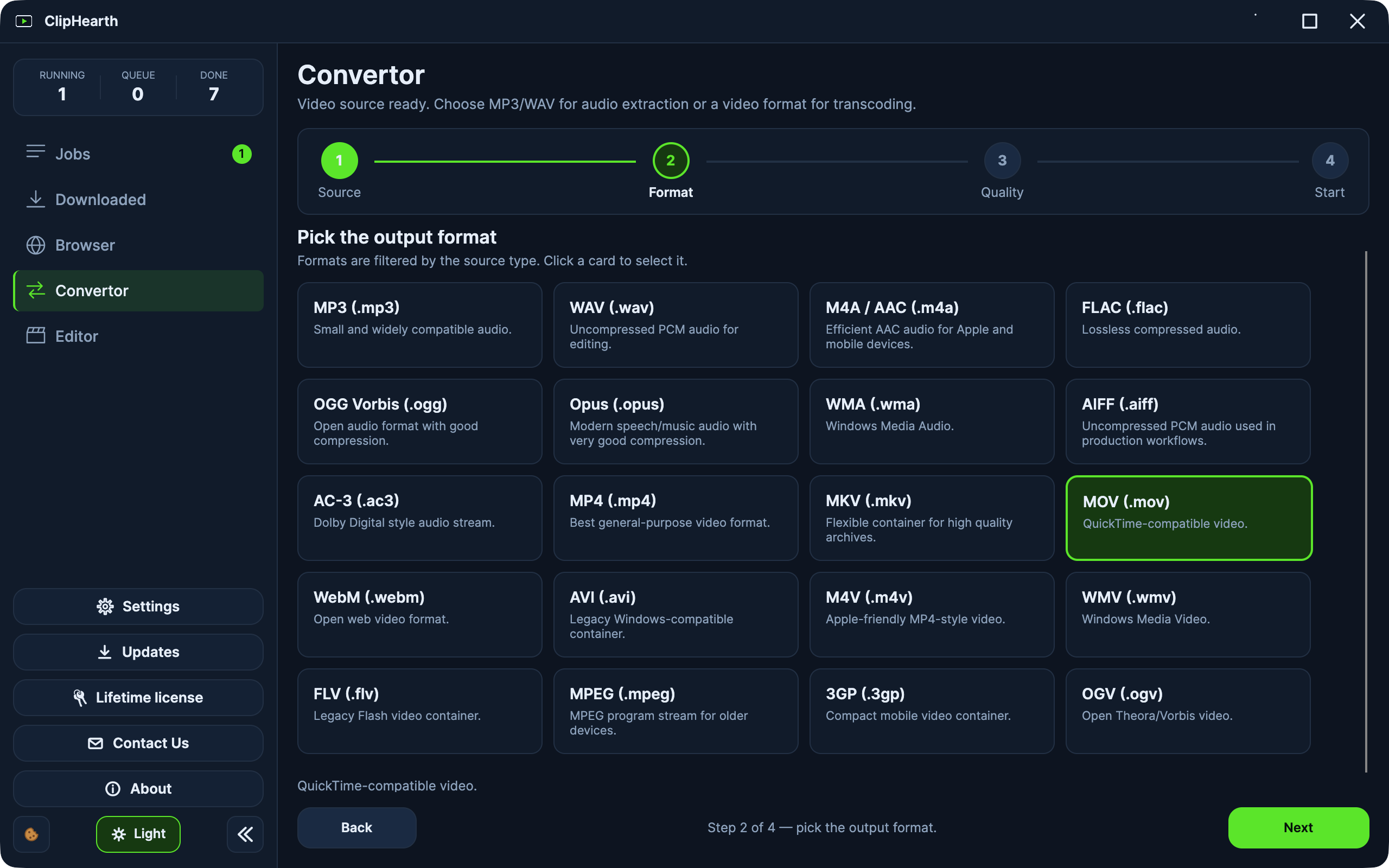
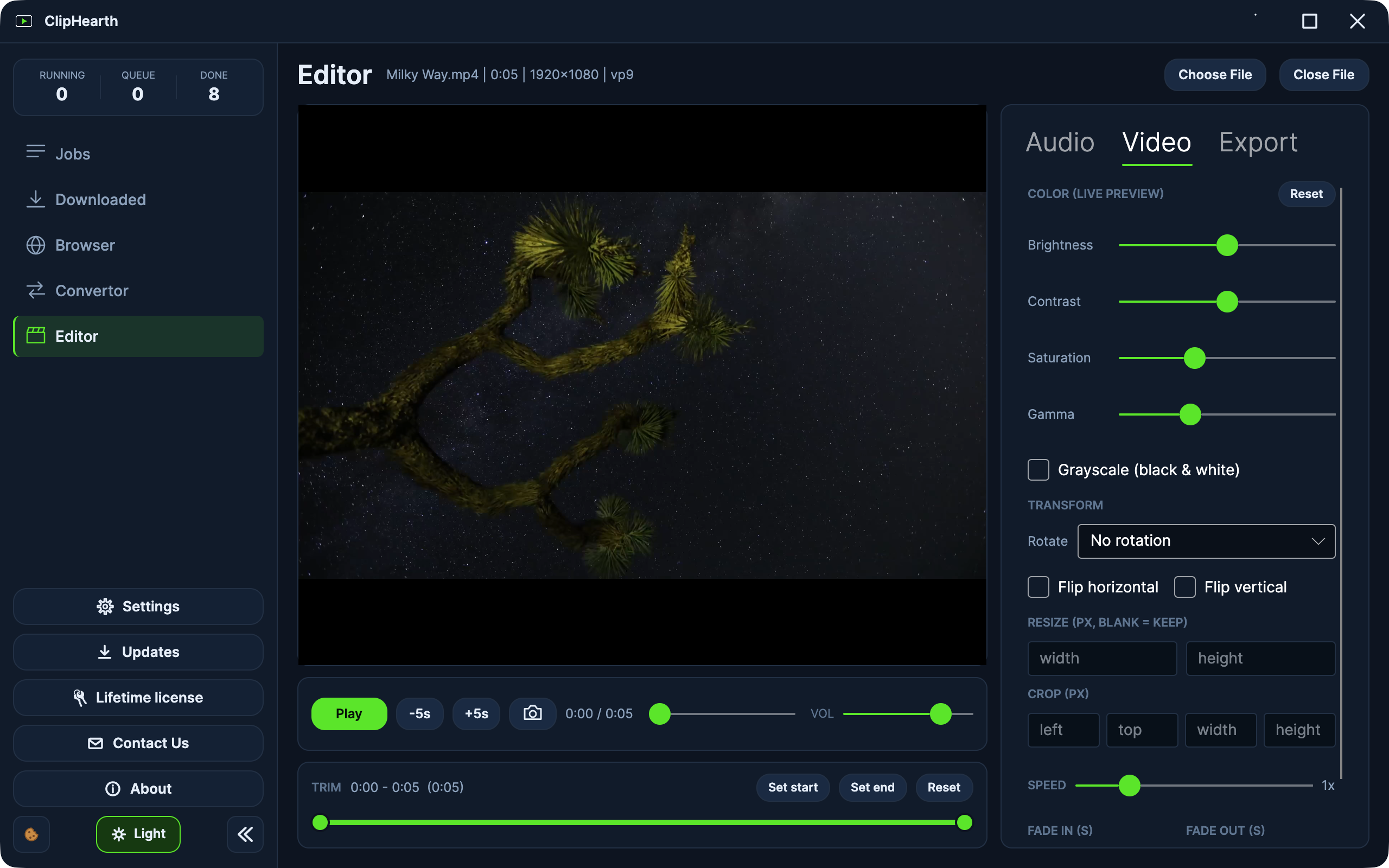
More screenshots, in full size, in the press kit.
Get ClipHearth 1.3.9. Try it free.
Every download runs in trial mode: 3 tasks per device, no card, no account. Pick a lifetime license or a monthly plan only if you want to keep going.
Windows
Windows 10 or later
macOS
Apple Silicon or Intel · signed and notarized by Apple
Linux
x64 or arm64 · .deb or tar.gz
What's new in 1.3.92026-09-22
- macOS: ClipHearth is signed with an Apple Developer ID and notarized by Apple, so it opens straight away. The security warning on the first launch is gone.
Before you install
- FFmpeg and the media engine ship inside every build.
- The Windows installer adds the Microsoft WebView2 runtime if it's missing, so keep the connection on during setup.
- Debian, Ubuntu, Mint:
sudo apt install ./cliphearth_1.3.9_amd64.debinstalls what the app needs and adds the ClipHearth repository, so updates arrive through apt. - Other Linux: unpack the archive and run
./install.sh; it lists the packages your distribution still needs. Full install guide - macOS builds are signed with a Developer ID and notarized by Apple, so they open straight away. Not sure which Mac you have? Apple menu → About This Mac; "Apple M…" means Apple Silicon.
- Checksums for every file: SHA256SUMS.txt
Windows installers are signed through Microsoft Trusted Signing, macOS builds with an Apple Developer ID and notarized by Apple, and the Debian package comes from our signed repository. Updates install only when they carry our signature, and every file has a published checksum.
The app carries no analytics and no telemetry. It talks to our server to confirm your license and to ask whether an update exists, and diagnostics logging stays off until support asks for it.
Pages you open, files you save and everything you convert stay on your computer. The built-in browser blocks the ads and trackers around a page before they load and hides cookie prompts.
No toolbars, no bundled offers, no ads inside the app. Conversions and edits are always written as a new file, so your originals stay as they were.
How ClipHearth works
- 01
Detect
Browse normally in the built-in browser. The stream detector watches network traffic, filters out advertising streams, and surfaces playable media, including live streams, as one clear action. Sound is detected on its own: music and podcast pages, sound-only streams, and plain audio files show Audio found.
video found - 02
Capture
Download in the best quality on offer, up to 4K, with subtitles embedded automatically. Record live streams in real time, grab just the section you need, or queue a whole playlist of up to 500 entries. A live audio stream records until you click Stop and Save.
queue → running → done - 03
Convert
Turn anything in your library into the format you need: 11 video and 9 audio outputs, one-click quality profiles or full manual control. Lossless and near instant when only the container changes.
conversion complete - 04
Edit
Trim, join clips, fix color, change speed, reshape the audio. Every export is written as a new file, so the original stays untouched.
exported as new file
Built like an instrument, not a widget.
Every capability below ships in the app today, and most of them are in the interactive demo above. Nothing on this list is aspirational.
- Stream detector
- A real embedded browser with tabs, favorites, history, and an address bar that suggests pages from the first letter you type. A detector box next to the tabs shows what was found and what is being recorded. It scores every media request, filters ad streams, and picks the highest-quality variant (HLS, DASH, or direct files) before you click Download.
- Ad & tracker blocking
- The built-in browser refuses the ads and trackers a page loads around its content, using the public EasyList and EasyPrivacy filter lists plus ClipHearth's own rules, and hides the empty slots they leave. A site's own video player is left alone, so playback behaves the way the site intends. Cookie consent prompts are hidden too; while one stays unanswered, sites set only their technical cookies. All of it is on by default and can be switched off in Settings. Sign-in providers and human-verification checks are never blocked.
- Live recording
- When a live stream is playing, Download becomes Record Live. Capture in real time and stop whenever you like. Everything up to that point is saved.
- Sound & radio
- Sound is a capability of its own. Pages that play MP3, AAC, FLAC, or OGG files, sound-only HLS and DASH streams, and music or podcast sites show Audio found with a Download Audio button, and the file is saved in its original format, without re-encoding. A live audio stream shows Live audio found; Record Audio keeps recording as MP3, AAC, or OGG until you click Stop and Save.
- Playlists & sections
- Queue an entire playlist or channel in one action, up to 500 entries. Or download just a time range with the built-in section picker. Subtitles are fetched and embedded automatically.
- Convertor
- Batch conversion with the same settings applied across files. Pick Small file, Balanced, or High quality, or go manual with codec, CRF, bitrate, fps, and resolution, and save your own named presets.
- Editor
- Trim and join clips, adjust brightness, contrast, saturation, and gamma, rotate, crop, and resize, change speed from 0.25× to 4×, replace or mix the audio track, normalize loudness, export animated GIFs, and snapshot frames to PNG.
- Performance
- FFmpeg and the media engine ship inside the app: no codec packs, no separate installs. Exports use your machine's hardware encoder when available, and the job queue runs downloads in parallel.
- Trust & updates
- Automatic updates install only when they carry the signature of ClipHearth's publisher, checked before anything is written. On Debian, Ubuntu, and Mint, updates arrive through apt from the signed ClipHearth repository. Your license is confirmed with our activation server while you work; if it can't be reached, a lifetime license keeps going for up to 40 tasks or 30 days and a subscription for up to 15 tasks or 7 days. Diagnostics logging is there when support needs it, and off by default.
Pricing
Lifetime license
€ —loading price…
- ClipHearth for Windows, macOS, and Linux
- Browser capture, Convertor, and Editor: every tool included
- Signed automatic updates
- Up to 30 days offline between license checks
- Key delivered instantly, on screen and by e-mail
- 1 device per license
14-day money-back guarantee · Refund policy
Monthly subscription
€ —loading price…
- ClipHearth for Windows, macOS, and Linux
- Browser capture, Convertor, and Editor: every tool included
- Signed automatic updates
- Up to 7 days offline between license checks
- Renews automatically through Stripe
- 1 device per license
Cancel any time from your receipt · Refund policy
Frequently asked questions
Step-by-step guides live in Help: installing, fixing a failed download, activating a licence.
Is downloading with ClipHearth legal?
ClipHearth is for media you own, created yourself, are authorized to use, or may lawfully process. That's the agreement you accept on first run. The app does not circumvent DRM, and protected content is not supported.
Can I try it before buying?
Yes. The app runs in trial mode with 3 free tasks per device, enough to test a download, a conversion, and an edit. When the third one is used up, the next click opens an offer to buy a license or to enter a key you already have, and the task carries on the moment the key is activated.
Which platforms are supported?
Windows 10 and later (64-bit and 32-bit installers), macOS (Apple Silicon and Intel), and Linux on x64 and arm64: a .deb for Debian, Ubuntu, and Mint that updates through apt, and a tar.gz with an install script for other distributions. FFmpeg and the media engine are bundled in every build.
How does the license work?
Pick a lifetime license (one payment, no expiry, 14-day money-back guarantee) or a monthly subscription (cancel any time). Your key shows up on the confirmation page and by e-mail right after checkout and activates the app on one device. The app confirms the license with our server while you use it; without a connection a lifetime license keeps working for up to 30 days (40 tasks) and a subscription for up to 7 days (15 tasks). A subscription keeps working until the paid-through date, even after you cancel.
What if I reinstall ClipHearth or change computer?
Reinstalling ClipHearth, or losing its license file, keeps your license: the app recognises the computer and gets the license back on its own, without the key. A fresh install of the operating system, a different user account or a new computer counts as a new computer, so the old one has to be released first - write to [email protected] from the address you bought with and we will do it.
Can I switch from monthly to lifetime?
Yes, from the app: License → Upgrade to lifetime, or open cliphearth.com/upgrade and paste your key. You pay the normal lifetime price once. The lifetime license starts when the period you have already paid for ends. Those days are not refunded, and nothing is charged again after that. We cancel the monthly charge for you and your activation key stays the same. Change your mind within 14 days? The refund deactivates the lifetime licence, and we give you back the subscription days you had not used yet.
Who is the seller, and are taxes included?
Payments run through Stripe, and Stripe's Link is the merchant of record: VAT or sales tax is handled at checkout, receipts and invoices come from Link, and refund or payment questions go through Link support or [email protected]. Prices are shown in EUR with tax included; Stripe converts them to your local currency at checkout.
What formats can it produce?
Video: MP4, MKV, MOV, WebM, AVI, M4V, WMV, FLV, MPEG, 3GP, and OGV. Audio: MP3, WAV, M4A/AAC, FLAC, OGG Vorbis, Opus, WMA, AIFF, and AC-3. The Editor can also export animated GIFs and save PNG frame snapshots.
Can I save just the sound?
Yes. When a page plays audio on its own (a music or podcast page, a sound-only stream, or a plain MP3, AAC, FLAC, or OGG file), ClipHearth shows Audio found and Download Audio, and saves the file in its original format without re-encoding. A live audio stream, such as an internet radio station you are authorized to record, shows Live audio found; Record Audio keeps going until you click Stop and Save. Pulling the soundtrack out of a video still uses the audio format from Settings.
Does editing overwrite my files?
Never. Every edit and conversion is exported as a new file, and the original stays untouched.
Questions before you buy?
Ask about licensing, platform support, or anything the FAQ didn't cover. Replies come from a human.